
If you sell on Amazon in the US, UK, or India, you've probably wondered what a top competitor is actually making each month. Guessing from Best Seller Rank or review count only gets you so far. To genuinely track competitors' revenue on Amazon, you need a tool that pulls sales estimates behind the scenes. Helium 10's Blackbox does exactly that.
This guide walks through the exact Blackbox workflow we use at YourSeller to estimate ASIN-level competitor revenue. It also covers how reliable those numbers actually are and how often you should be checking them. We'll close with what's changing in 2026, as AI tools start pulling this data automatically instead of through a spreadsheet.
Tracking competitors' revenue on Amazon means using a tool like Helium 10's Blackbox to estimate how much a specific competitor ASIN sells each month. The estimate is built from Best Seller Rank and category sales data. Sellers enter competitor ASINs, pull estimated monthly sales and revenue, and log the numbers in a tracking template to monitor trends over time.
These estimates aren't exact. Amazon doesn't publish competitor sales data, but the figures are accurate enough to spot pricing gaps, seasonal shifts, and which competitors are actually worth watching. For sellers in competitive categories, this beats guessing from review counts alone. It's become a standard part of Amazon competitor analysis for agencies managing multiple brands across the USA, UK, and India.
Why Track Competitor Revenue on Amazon?
Before setting up any tracking system, it helps to know what the numbers are actually for. Competitor revenue tracking isn't idle curiosity about a rival's sales. Used right, it shapes four real decisions.
Spotting market shifts early. When a competitor's estimated revenue jumps sharply in a short window, that's often the first sign of a trend. It shows up here before it ever appears in your own search volume. A category that looks flat on the surface can be quietly heating up underneath it.
Reading pricing moves before they hurt you. A revenue spike paired with a price drop usually means a competitor is chasing volume, not margin. That's useful information. You can decide whether to match the move, hold your price, or lean into value messaging instead.
Finding real product gaps, not guessed ones. Revenue data alone won't tell you why a competitor is winning. Paired with their listing and reviews, it points you toward the specific SKUs worth studying, instead of every competitor in the category.
Setting an honest benchmark. A top competitor in your category might move roughly $40,000 to $60,000 a month. That's a real number to grow toward, rather than an arbitrary internal target pulled from nowhere.
How to Track Competitor Revenue Using Helium 10 Blackbox
Blackbox is built primarily as a product-research tool. Its Product Targeting search, though, works just as well for competitor revenue tracking. Here's the exact process, step by step.
Step 1: Set Up Your Helium 10 Account and Open Blackbox
You'll need an active Helium 10 subscription. The free trial covers this workflow if you're testing it first. Once you're logged in, go to Tools in the main menu and open Blackbox.
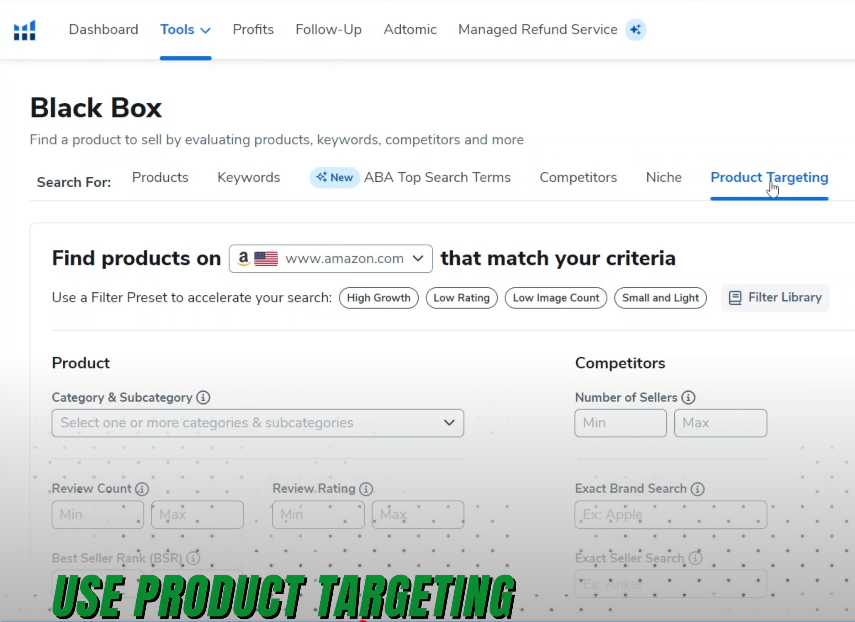
Step 2: Choose Product Targeting Inside Blackbox
Blackbox's Product Targeting search pulls competitor-level data instead of broad category results. From the Blackbox home screen, select Product Targeting before entering any ASINs.
Step 3: Enter Your Competitors' ASINs
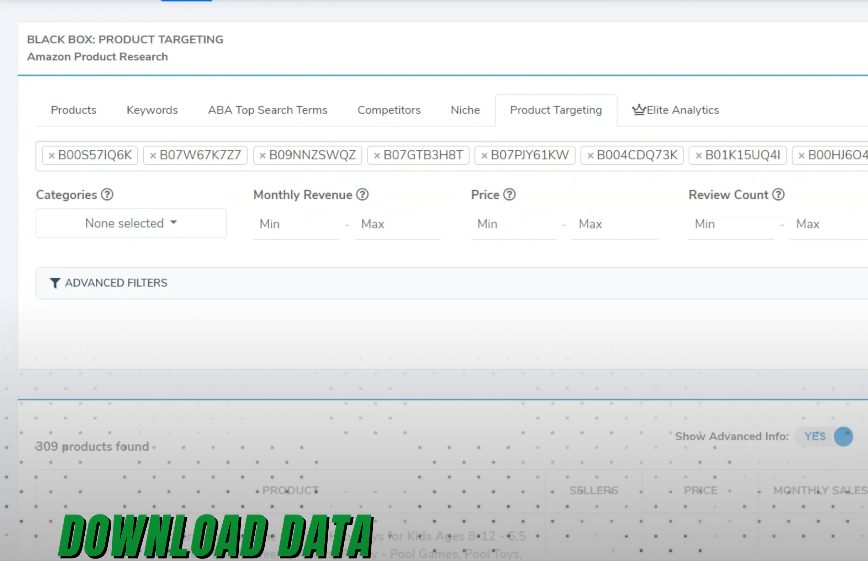
Add the ASINs of the products you actually compete against, up to 10 at a time. Stick to genuine rivals in your exact subcategory, rather than the whole top ten in a broad category. A wider net just gives you noisier, less actionable data.
Step 4: Download the CSV Report
Run the search, and Blackbox generates a report with estimated monthly sales, revenue, price, and related metrics for every ASIN you entered. Click Download CSV to export it. The file also includes related products Blackbox surfaces on its own. That's often how you discover a competitor you hadn't been watching.
Step 5: Copy the Data Into Your Tracking Template
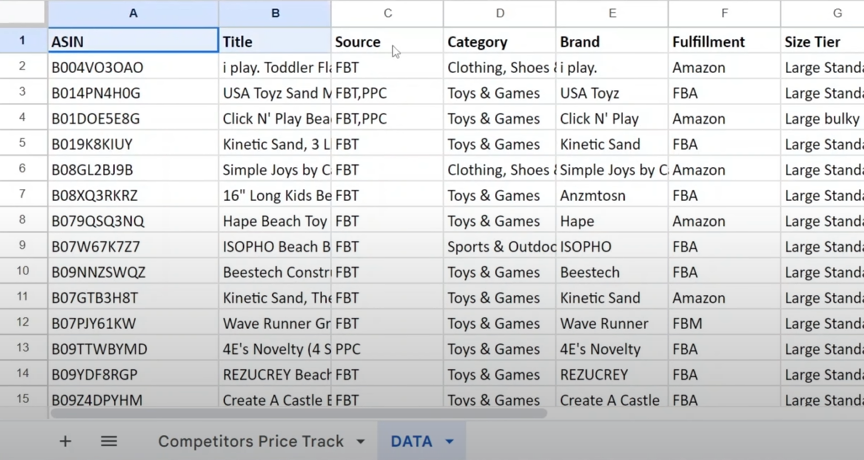
Paste the CSV data into the data sub-sheet of a dedicated revenue tracking spreadsheet. Keep this separate from your own sales data. Mixing first-party and estimated third-party numbers in the same sheet makes it too easy to compare figures that were never measured the same way in the first place.
Step 6: Pull the Numbers Into Your Main Tracker
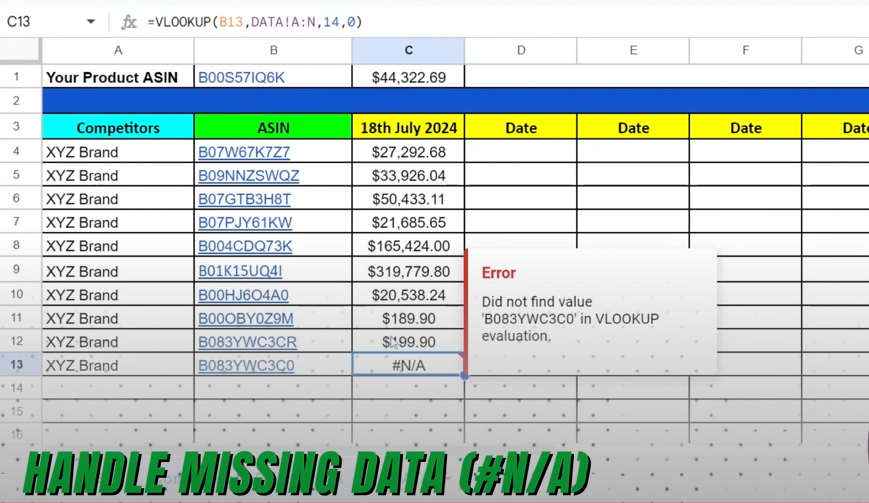
In your main tracking sheet, use a lookup formula, either VLOOKUP or XLOOKUP depending on your spreadsheet tool, referencing each ASIN against the data sub-sheet. Drag it down the column. Every ASIN then updates automatically each time you refresh the data.
Step 7: Handle Missing or "NA" Data
An "NA" result usually means the product went out of stock, changed ASIN, or dropped out of the category Blackbox is scanning. Re-run the search for that specific ASIN first. If "NA" persists, check the live listing directly. It may have been suppressed, or the seller may have switched fulfillment methods.
How Accurate Are Helium 10's Competitor Revenue Estimates?
This is the question every seller should ask before building a strategy around these numbers. It's one most guides skip entirely.
Blackbox estimates revenue by modeling Best Seller Rank against known category sales velocity. It's a statistical model, not a direct read of a competitor's books. In stable, high-volume categories, the estimates tend to land within a reasonable range of actual performance. In thin or highly seasonal categories, a single stockout or a BSR glitch can throw a number off for a few days.
Treat the figures directionally, not as bookkeeping. A jump from $8,000 to $22,000 in estimated monthly revenue is a real signal worth investigating. A shift from $8,000 to $8,900 is normal noise. It shouldn't trigger a strategy change on its own.
This is also where competitor estimates differ from tracking your own numbers. Your own Amazon Business Reports give you exact figures, not modeled ones. If you haven't set up that side of your tracking yet, our guide to tracking daily orders and revenue per SKU on Amazon FBA walks through the process using Seller Central's own reports.
Weekly vs. Daily Competitor Revenue Tracking: What Actually Works
It's tempting to check Blackbox every morning, especially early on. In practice, weekly tracking gives you a cleaner signal for far less time cost.

| Tracking Cadence | What It Shows You | Best For |
|---|---|---|
| Daily | Short-term noise, stockouts, single-day promotions | Launch week monitoring, Prime Day or BFCM windows |
| Weekly | Genuine trend direction, pricing pattern shifts | Ongoing competitor monitoring, most sellers most of the time |
| Monthly | Category-level shifts, seasonal comparison | Quarterly strategy reviews, benchmarking against your own growth |
For most sellers tracking five to ten competitor ASINs, weekly is the right default. Daily tracking earns its place only around a launch, a major promotion, or a price war. These are the moments where a same-day reaction genuinely changes the outcome. Outside of that, checking daily mostly adds noise and eats time better spent acting on last week's data.
What's Changing in Competitor Revenue Tracking in 2026?
Two shifts are worth knowing about if you set this workflow up more than a year ago.
Helium 10 recently rolled out an MCP integration that lets AI tools pull live Blackbox data directly. That includes BSR, estimated revenue, review count, and price for a set of competitors, without the manual CSV-and-spreadsheet steps above. It's early, and the manual method in this guide still works and still gives you full control over the data. But it's a clear sign the workflow is heading toward AI-assisted analysis rather than pure spreadsheet work.
The second shift: Amazon's own free Product Opportunity Explorer, inside Seller Central's Growth section, now gives category-level benchmarking at no extra cost, covering average pricing, top search terms, and click-share leaders. It won't give you a specific competitor's estimated monthly revenue the way Blackbox does. For category-level pricing and keyword benchmarking, though, Amazon's own free competitor research tool covers that ground well and is worth running alongside Blackbox rather than instead of it.
Conclusion
Tracking competitors' revenue on Amazon isn't about copying what a rival sells. It's about knowing which pricing moves, product launches, and category shifts are worth reacting to, and which ones are just noise.
Helium 10's Blackbox remains the fastest way to get ASIN-specific competitor revenue estimates. That's true as long as you read the numbers directionally and check them on a cadence that matches what's happening in your category. Pair it with your own first-party sales data and, where it fits, Amazon's free category tools. Together, they give you a genuinely complete picture instead of one number in isolation.
Frequently Asked Questions
1. How can I track Amazon competitors' revenue using Helium 10?
Use Helium 10's Blackbox tool under Product Targeting. Enter your competitors' ASINs, download the CSV report, and paste the data into a tracking template. This gives you estimated monthly revenue and sales for each ASIN, which you can update weekly to spot trends.
2. Can you actually see a competitor's real revenue on Amazon?
Not directly. Amazon doesn't publish seller-level or ASIN-level revenue figures. Helium 10 estimates it by modeling Best Seller Rank against known category sales data. That gets close in most stable categories, but it isn't a substitute for a competitor's actual books.
3. How accurate are Helium 10's Blackbox revenue estimates?
They're accurate enough to be directionally useful, especially in high-volume, stable categories. In thin or seasonal categories, a stockout or ranking glitch can skew a single reading. Treat large swings as signals worth investigating, not exact numbers to plan around.
4. Should I track competitor revenue daily or weekly?
Weekly, for most sellers. It captures genuine trend direction without the noise of daily fluctuations. Daily tracking is worth the extra time only around a product launch, a major promotion, or an active price war.
5. Does Helium 10's new AI integration replace the manual Blackbox workflow?
Not yet. The MCP integration lets AI tools pull the same Blackbox data automatically, which speeds up analysis. The underlying data and its accuracy limits, though, are identical to the manual CSV method covered in this guide.
6. What's the difference between Blackbox and Amazon's Product Opportunity Explorer?
Blackbox gives you a specific competitor's estimated monthly revenue and sales, ASIN by ASIN. Product Opportunity Explorer, Amazon's own free tool, gives category-level averages instead — pricing, search terms, and click-share leaders. Use Blackbox to watch named rivals and Opportunity Explorer to understand the category around them.
Ready to Turn Competitor Data Into an Amazon Growth Plan?
Tracking the numbers is only useful if you act on them. At YourSeller, we build competitor revenue tracking into the account management work we already do for Amazon sellers across the USA, UK, and India. We pair it with pricing strategy, PPC adjustments, and listing optimization, so the insight actually moves your sales, not just your spreadsheet.
If you'd rather have an experienced Amazon growth agency handle this alongside the rest of your account, reach out to YourSeller at +91 9909513312 or contact@yourseller.in. We'll walk you through how we track competitor performance for accounts like yours.
