
How to Create Pro Amazon Product Images Using Nano Banana AI and Canva
Creating high-quality product visuals is no longer optional for sellers competing on Amazon. In a marketplace where thousands of similar products fight for attention, your images often decide whether a shopper clicks or scrolls past. Today, successful brands rely on Amazon product listing images that not only look professional but also communicate value instantly.
With modern tools like Nano Banana AI and Canva, sellers can now produce professional-quality visuals without relying on expensive photographers or design agencies. This guide explains how to build conversion-focused visuals step by step while following Amazon’s strict image standards and improving performance across your listings.
Why High-Quality Amazon Product Images Matter
Amazon is a visual-first marketplace. Shoppers scroll fast, compare multiple listings, and make decisions within seconds. Your product images often determine whether a shopper clicks your listing or moves on.
High-quality images help:
Build trust and credibility
Clearly communicate product benefits
Reduce confusion and returns
Increase conversion rates
Improve overall listing performance
Amazon also enforces strict image guidelines. If your images don’t meet these standards, your listing may underperform or even be suppressed.
That’s why learning how to create optimized Amazon PDP images using AI tools like Nano Banana and Canva is a game-changer for sellers at every level.
Step 1: Upload Your Product Image to Nano Banana AI

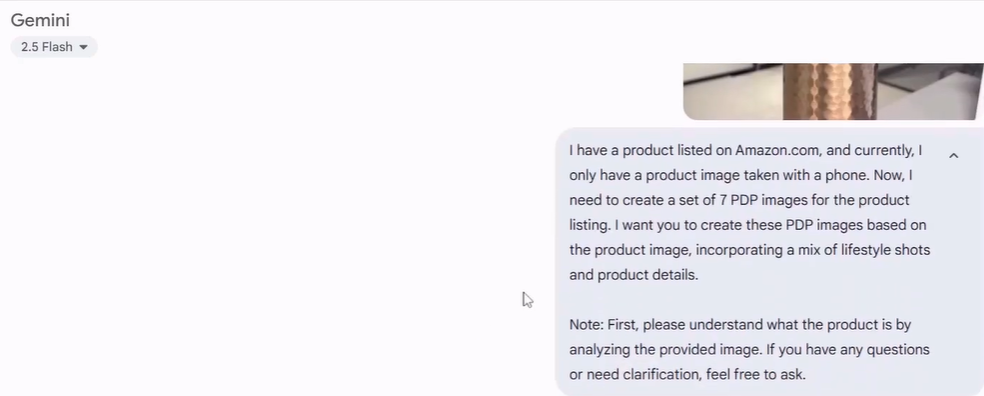
The process starts with a simple product photo. You don’t need a professional camera. Modern smartphone images work well if the lighting is decent.
Upload your product image to Nano Banana AI, an advanced tool designed for creating AI-generated product images. Then, provide a short prompt describing what you want. For example, you can mention that the image is for an Amazon listing and that you want multiple visuals, such as lifestyle shots and product-focused images.
Nano Banana AI analyzes your product and generates multiple creative variations. This saves hours compared to traditional photography and editing workflows.
This step is beneficial for sellers launching new products or updating older listings that lack visual appeal. It’s one of the fastest ways to begin DIY Amazon image creation while maintaining professional quality.
Step 2: Generate Lifestyle and Product Detail Images
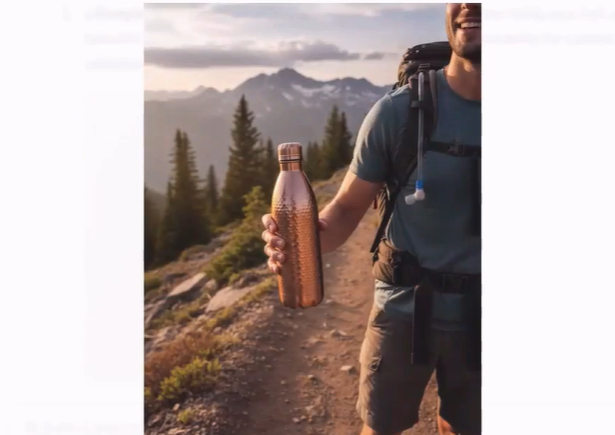
Once the AI generates images, you’ll notice a mix of product-focused and lifestyle-style visuals. These are crucial for storytelling.
Lifestyle images help customers imagine the product in real-life situations. They show how the item fits into daily use, making it easier for buyers to connect emotionally with the product.
Product detail images for Amazon, on the other hand, focus on features, materials, and functionality. These visuals help reduce hesitation by answering common buyer questions visually.
At this stage, the images may look good but still feel incomplete. That’s normal. The next step is refining them for clarity, branding, and conversion.
Step 3: Add Context, Benefits, and Visual Messaging



AI-generated product images often look clean but lack purpose unless appropriately guided. To fix this, refine your prompts or edits by adding clear intent.
Ask the Nano Banana AI to:
Highlight product benefits
Emphasize unique selling points
Add context that explains how the product is used
This is where your product knowledge becomes valuable. The clearer and more detailed your guidance, the better the outcome will be.
For example, instead of a generic image, you can request visuals that show durability, comfort, material quality, or everyday use. These elements help shoppers understand why your product stands out.
In addition, this step strengthens Amazon A+ content creation, where visuals are used to explain, not just display. Compelling imagery answers buyer questions before they arise, increasing trust and reducing friction.
Step 4: Optimize Images in Canva for Amazon Standards
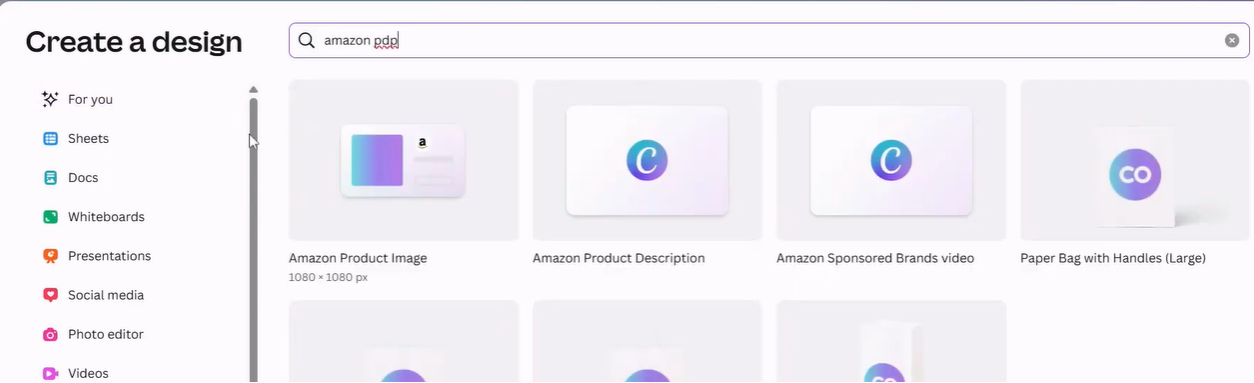
Once you have your AI-generated visuals, import them into Canva to make them Amazon-ready. Canva is one of the most powerful tools for Amazon product image editing, allowing sellers to refine visuals without design expertise.
Search for “Amazon PDP” templates inside Canva. These layouts are designed to follow Amazon’s image guidelines and help maintain consistency across your listing.
Main Image Optimization
Your main image must:
Have a pure white background
Display only the product (no props or text)
Be centered and fill most of the frame
Canva’s background removal tools make removing background from Amazon images quick and precise, ensuring full compliance.
Secondary Image Optimization
For secondary images, you can:
Add benefit callouts
Highlight features or dimensions
Include lifestyle visuals
Maintain consistent fonts and colors
This is where branding becomes essential. Consistent fonts, color schemes, and layouts help build trust and recognition across your product catalog. It supports Amazon product image optimization and strengthens overall listing performance.
Fixing Image Gaps and Enhancing Visual Quality
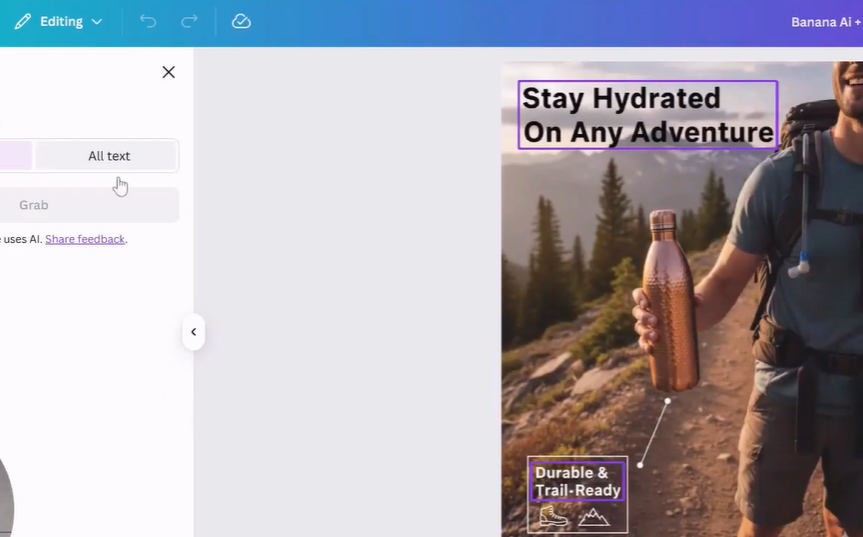
Sometimes AI-generated images don’t perfectly fill the frame or include unwanted elements. Canva’s advanced tools help fix this easily.
Magic Expand extends the image naturally to fit the frame
Magic Eraser removes unwanted logos or objects
Magic Grab allows you to reposition the product for better composition
These features allow sellers to fine-tune visuals without professional editing skills, making DIY Amazon image creation accessible to everyone.
Why This Nano Banana AI + Canva Workflow Works So Well
This approach saves time, reduces costs, and produces consistent results. You don’t need expensive photography equipment or designers to create high-quality visuals.
Benefits include:
Faster image production
Lower creative costs
Greater flexibility for testing and optimization
Better alignment with Amazon’s image requirements
For growing brands, this method makes scaling product listings much easier.
Best Practices for Optimizing Amazon Product Images
To get the most out of your visuals, keep these best practices in mind:
Use clean, uncluttered images
Maintain consistent branding across all images
Highlight one key benefit per image
Use lifestyle visuals to show real-world use
Ensure images look good on both desktop and mobile
These practices directly contribute to increasing conversion with better product images, especially in competitive categories.
How Your Seller Agency Helps You Scale Faster
At YourSeller, we help brands grow by combining strategy, creativity, and execution. Our services are designed to support sellers at every stage of their journey.
We offer:
Amazon Listing and Cataloging to build optimized, compliant listings
Amazon Advertising Services to drive targeted traffic and sales
Branding Services to create a strong and consistent visual identity
Amazon Seller Registration support for new sellers entering the marketplace
Our team understands how to turn product pages into high-performing sales assets.
Final Thoughts
Creating professional Amazon product listing images no longer requires expensive photoshoots or advanced design skills. With tools like Nano Banana AI and Canva, sellers can produce high-quality visuals that meet Amazon’s standards and attract more buyers.
When combined with the right strategy and expert guidance, these tools can dramatically improve listing performance and brand perception.
If you’re ready to elevate your Amazon presence, optimize your listings, and grow faster, working with an experienced Amazon growth agency can make all the difference. Let your visuals work harder for you and turn more clicks into conversions.
Turn Your Product Images into Sales Engines with Our Amazon Growth Agency
If your Amazon listings look good but aren’t converting the way they should, it’s time to move beyond basic visuals and start building product pages that actually sell. At YourSeller, we help brands transform ordinary listings into high-performing storefronts using a strategic mix of Amazon listing and cataloging, creative image optimization, and data-backed structure.
Our team doesn’t just create images. We build complete visual ecosystems designed to attract, inform, and convert. From refining your product presentation to crafting scroll-stopping visuals through advanced Amazon advertising services, we help your listings stand out in crowded marketplaces.
Whether you’re launching a new product, refreshing outdated listings, or scaling an existing brand, our experts guide you through every step. We combine innovative design, proven Amazon guidelines, and brand-focused storytelling to help you win buyer attention and trust.
If you’re starting from scratch, our Amazon seller registration support ensures a smooth setup with the proper foundation from day one. For growing brands, our branding services help create consistency across every image, listing, and campaign.
If you’re serious about growth and want your product images to do more than just look good, it’s time to partner with a results-driven Amazon growth agency. Let’s turn your listings into high-performing assets that drive visibility, clicks, and sales. Call us at +1 510-648-3933 (USA) or +91 9909513312 (India) for a free consultation with our Amazon growth experts.
